 Auto FE Updater Auto FE Updater
 | Home Basic Info Download About |
| Basic Info Wizard Update Config File Forms Enterprise Edition |
|
Wizard - Server Folder
File Name To Start You can also use environment variables in the Target Folder, Server and shortcut lines. These must have %s around them. These are the same variables you can see when you run the SET command in the command prompt window. Examples would be %APPDATA%, %USERPROFILE%, %HOMEDRIVE% or %HOMEPATH% Browse for server folder and file name to start View list of files to be copied
|
 Granite Fleet Manager
- the best designed fleet maintenance tracking and
management system available
Granite Fleet Manager
- the best designed fleet maintenance tracking and
management system available
| Contact | Search | Site Map | FAQ | Tony's Main Microsoft Access Page | Privacy Policy |
Website copyright © 2001-2018 Tony Toews |
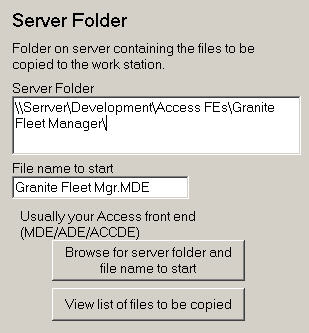 Server Folder